
Why Use Folder Lock?
Folder Lock is a free Windows application that provides instant protection for your private files and folders. Whether you're protecting personal documents, sensitive business files, or confidential data, Folder Lock keeps your information secure from unauthorized access.
According to Microsoft's PC Security guidelines, protecting sensitive folders with encryption is one of the most effective ways to prevent data theft. With digital security threats on the rise, having a reliable file protection solution like Folder Lock is essential for Windows 10 and Windows 11 users.
Folder Lock Key Features
- ✓ Password protect folders with ease
- ✓ Military-grade encryption for sensitive files
- ✓ Simple, intuitive interface - no technical knowledge required
- ✓ Hide folders completely from view
- ✓ Fast locking and unlocking functionality
- ✓ Lightweight app with minimal system impact
- ✓ Works with USB drives and external storage devices
- ✓ Compatible with Windows 10 and Windows 11
Benefits of Folder Lock Protection
Protect Your Personal Data with Folder Lock
In today's digital landscape, safeguarding personal information is more important than ever. According to CISA (Cybersecurity and Infrastructure Security Agency), data encryption is one of the most effective cybersecurity measures. Folder Lock uses industry-standard encryption to ensure your documents remain private and secure from threats and unauthorized access.
Why Folder Lock is Easy to Use
Unlike complex security software, Folder Lock requires no technical expertise. Simply select a folder, set a password, and your data is protected. The straightforward design makes Folder Lock accessible for both home users and professionals who need quick folder protection solutions.
Folder Lock Works on Any Windows PC
Whether you're using an older machine or the latest hardware, Folder Lock runs smoothly without slowing down your system. It's optimized for both 32-bit and 64-bit operating systems, ensuring Folder Lock compatibility across all Windows environments.
Folder Lock Application Interface
Here's how simple it is to protect your folders with Folder Lock on Windows:
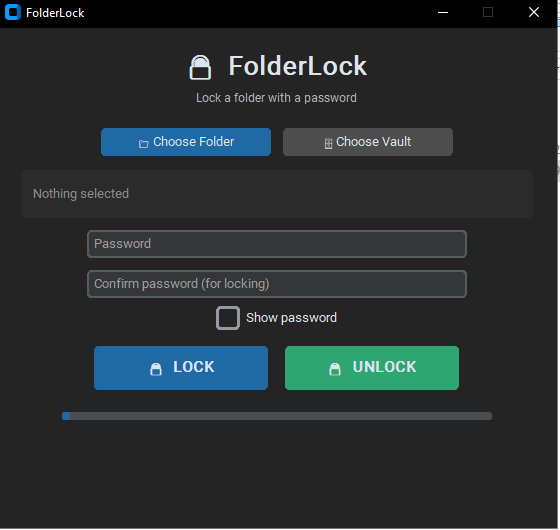
Folder Lock user-friendly desktop interface for Windows 10 & 11 folder protection
System Requirements
Minimum Requirements
Operating System: Windows 10, Windows 11
Processor: Intel or AMD processor (1 GHz or faster)
RAM: 512 MB minimum (2 GB recommended)
Hard Disk Space: 50 MB free space
Internet: Not required (works offline)
Recommended Specifications
Operating System: Windows 11 (latest version)
RAM: 4 GB or higher
Processor: Modern multi-core processor
Hard Disk: SSD for optimal performance
Download Folder Lock Today
Get Folder Lock completely free. No registration needed, no hidden fees, no spyware. Start protecting your sensitive data today with our secure folder protection solution.
Folder Lock
sha256:b185fba2c01f3fb94f48ecafefd14c7402662d12fe5e48f76ac5495b58b9910c
Latest Folder Lock Version | Windows 10 & 11 Compatible | Free & Secure
Folder Lock Frequently Asked Questions
Yes, Folder Lock is completely free to download and use. No paid upgrades, no hidden charges, no trial limitations or restrictions.
Folder Lock works on Windows 10 and Windows 11. Both 32-bit and 64-bit versions of Windows are fully compatible with Folder Lock.
Yes, Folder Lock allows you to protect as many folders as needed. Simply select each one and apply password protection independently.
Folder Lock uses military-grade encryption standards to protect your data, ensuring files cannot be accessed without the correct password. Learn more about encryption standards at NIST.
Yes, you can access protected folders on any Windows computer by running Folder Lock and entering the correct password.
No, Folder Lock is lightweight and designed to have minimal impact on your system. It runs efficiently even on older computers.
Yes, Folder Lock works with USB drives, external hard drives, SD cards, and other external storage devices for comprehensive data protection.
More Windows Utilities Beyond Folder Lock
Besides Folder Lock, explore our complete suite of free Windows tools designed to organize, secure, and optimize your files and documents.
Barcode Reader
Read and generate barcodes instantly on Windows PC with our free application.
Learn More →Bulk Folder Creator
Create multiple folders at once from Excel spreadsheets - save time on batch operations.
Learn More →Excel to DBF Converter
Convert spreadsheets to DBF format instantly with our free desktop tool.
Learn More →PDF Compressor
Reduce PDF file size without losing quality - compress large files for sharing.
Learn More →Bulk PDF Printer
Print multiple PDF files in batch with our free printing software for Windows.
Learn More →PDF Page Extractor
Extract specific pages from PDF files easily and save as separate documents.
Learn More →