
Excel to DBF Converter for PC — Free Download
A free Excel to DBF converter for Windows PC that turns .xls and .xlsx files into standard dBASE .dbf format in seconds. Many government reporting systems, legacy databases, and data-entry software in India still require .dbf files — this offline Excel to DBF converter creates them directly on your desktop, so confidential data never leaves your computer. No installation, no registration, no file-size limits — just extract, select your Excel file, and convert.
Excel to DBF Converter For PC
sha256:846d49a33fa18811ebf07644f0acb63d8874cf7f1cf734d26c7ed130ad5b9a1d
More Free Desktop Software from GoAndUse
Browse all our tools on the free desktop software page.
Need a free Excel to DBF converter for your Windows PC? This lightweight desktop tool converts .xls and .xlsx files into standard dBASE .dbf format in seconds — completely offline, with no registration, no file-size limits and no data upload.
Key Features
- Excel to DBF in one clickConverts both modern .xlsx and legacy .xls files into standard dBASE .dbf format.
- 100% offline & privateEverything runs on your PC. Confidential records and government data never leave your computer.
- No file-size limitsConvert large sheets with thousands of rows — no upload limits like online tools.
- Clean, compliant outputProduces standard .dbf files that legacy database and reporting software accept without errors.
- Portable — no installationJust extract the ZIP and run the EXE. Nothing is installed, no admin rights needed.
- Made for real workflowsBuilt from 20+ years of database administration experience with government reporting systems.
- Free foreverNo trial, no watermark, no registration, no locked features.
- Online version tooNeed a quick one-time conversion on any device? Use our free online Excel to DBF tool.
How to Convert Excel to DBF on Your PC
- Download and extractDownload the ZIP from the box above and extract it to any folder. No installation is needed.
- Prepare your Excel fileKeep your data in a clean table — column headers in the first row, one record per row.
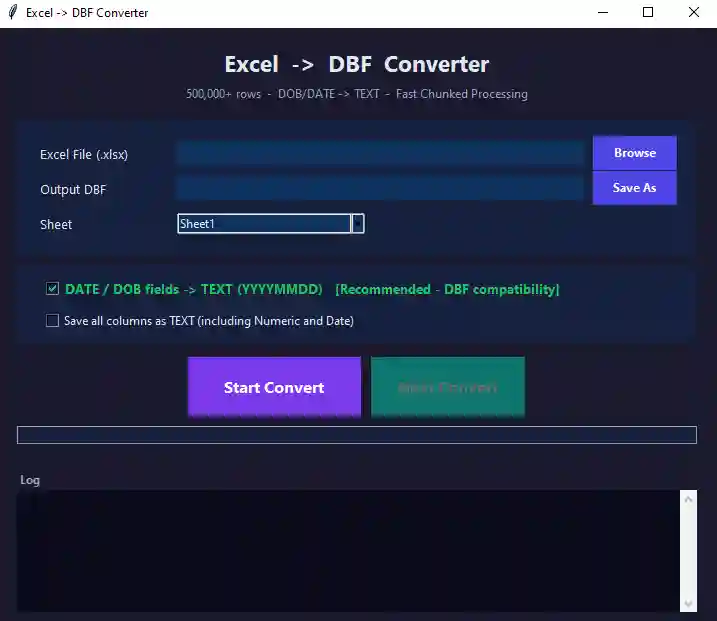
- Open the converter and select your fileRun the EXE, click Browse and pick your .xls or .xlsx file.
- ConvertClick Convert and choose where to save the .dbf file. Conversion takes seconds even for large sheets.
- Use the .dbf fileSubmit it to your reporting system or open it in any dBASE-compatible software — done.
Who Is It For?
This free Excel to DBF converter is built for data-entry operators preparing government submissions, bank and cooperative-society staff working with legacy utilities, accountants and auditors exchanging data with older systems, municipal and panchayat offices that still run dBASE-era software, and database administrators migrating Excel data into legacy applications.
System Requirements
| Operating system | Windows 10 / 11 (64-bit) |
|---|---|
| 32-bit / Windows 7 | Coming in the next update |
| Input formats | .xlsx and .xls (Excel 97 onwards) |
| Output format | dBASE .dbf |
| Installation | None — portable, just extract and run |
| Internet | Not required — works fully offline |
| Price | Free |
Frequently Asked Questions
How do I convert Excel to DBF for free?
Why can't Excel save as DBF any more?
Is my data uploaded anywhere during conversion?
Does it support both .xls and .xlsx files?
Is there a file-size or row limit?
What is the difference between the online and desktop versions?
Which software can open the converted .dbf file?
Excel to DBF Converter is developed and maintained by GoAndUse. Also try our free Bulk Folder Creator and Barcode Reader software for PC, or browse all GoAndUse desktop software. Found a bug or need a feature? Contact us.