
Barcode Reader Software For PC Free Download
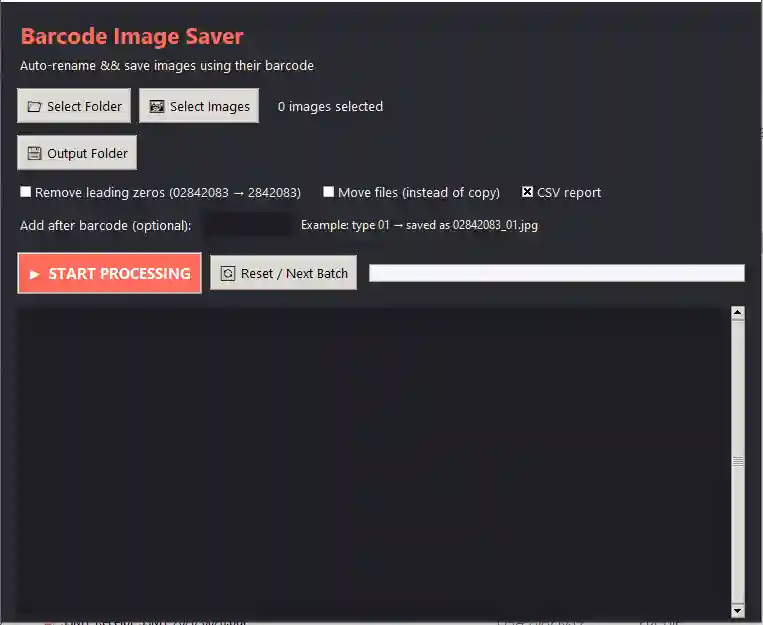
Looking for a free barcode readerfor your Windows PC? Barcode Image Saver is a lightweight Windows desktop app that scans barcodes from images in bulk, automatically renames each image using its barcode value, and generates a CSV report — all completely offline, with no registration and no watermarks.
Barcode Reader Software For PC Free Download
Windows 7 / 8 / 10 / 11 100% Free
sha256:c0fb54f91d86dd822973f5897ee0df7a02af25a823feb7774d9aea21013d76bcsha256:d606c296e5dc6ed37439304290d0d7f20781cccf59a1dbb52fa29d8146623062114 downloads
No registration • No ads inside the app • Checksum verified
Free Desktop Software for Windows
Handy free tools from GoAndUse — 100% offline, no registration, Windows 7 to 11.
Create multiple folders at once from an Excel file — free Windows tool. Reads .xls/.xlsx, live preview, sub-folder mode & CSV report. No batch script needed..
PDF Compressor reduces PDF file size on your desktop with three compression levels — Light, Medium, and Strong. Process multiple files at once
Browse all free desktop software or explore online tools on GoAndUse.
A Free Barcode Reader Built for Bulk Work
Scanning barcode images one by one is slow and error-prone. Whether you are processing scanned exam OMR sheets, warehouse inventory photos, courier labels, or document batches, Barcode Image Saver reads an entire folder of images in one click. It is powered by the industry-standard zxing-cpp barcode engine with a multi-strategy reading pipeline, so it can decode barcodes even from slightly blurry, rotated, or low-contrast scans that simpler tools miss.
Key Features
- Bulk folder processingPoint it at a folder — every image is scanned automatically in one batch.
- Auto-rename by barcodeEach image is saved as a copy named with its decoded barcode value, with an optional custom suffix.
- Multi-strategy readingMultiple decoding passes recover barcodes from imperfect, skewed, or low-quality scans.
- CSV reportA complete report of every file — decoded value and read status — ready to open in Excel.
- 100% offline & privateNo internet required. Your images never leave your computer.
- Old PC friendlySeparate 32-bit build runs on Windows 7 and older office machines.
- Batch workflowReset / Next Batch controls let you process folder after folder without restarting.
- Free foreverNo trial period, no locked features, no registration, no ads inside the app.
How to Use This Barcode Reader on Your PC
- Download and extractDownload the ZIP for your Windows version from the box above and extract it to any folder. No installation is needed.
- Run the appDouble-click BarcodeImageSaver.exe. Windows 7 users: install vc_redist.x86.exe once before the first run.
- Select your image folderChoose the folder that contains your barcode images (JPG, PNG and other common formats).
- Choose the output folderRenamed copies will be saved here — your original images are never modified.
- Start the scanClick Start and watch the progress. Add an optional suffix to filenames if you need one.
- Check the CSV reportOpen the generated CSV in Excel to review every decoded barcode and spot any unread images.
Who Is It For?
This free barcode reader is built for real-world Indian office workflows: examination processing (matching scanned OMR/answer sheets to roll-number barcodes), inventory and stock audits (renaming product photos by item barcode), courier and logistics (organising label scans), libraries and record rooms (accession-number barcodes), and any document management task where hundreds of scanned pages need to be identified by their barcode.
System Requirements
| Operating system | Windows 7 / 8 / 10 / 11 |
|---|---|
| 64-bit build | Windows 10/11 (recommended) |
| 32-bit build | Windows 7 and older PCs — install vc_redist.x86.exe once first |
| Installation | None — portable, just extract and run |
| Internet | Not required — works fully offline |
| Price | Free |
Frequently Asked Questions
Is Barcode Image Saver really free?
Which barcode types does it support?
Does it upload my images anywhere?
Does it modify my original images?
Will it run on Windows 7 or an old office PC?
My antivirus shows a warning on the 32-bit file. Is it safe?
What happens if a barcode cannot be read?
What is in the CSV report?
Barcode Image Saver is developed and maintained by GoAndUse. Found a bug or need a feature? Contact us — we actively update our free tools.