
Create Multiple Folders at Once From Excel
Need to create multiple folders at once? Bulk Folder Creator is a free Windows desktop app that reads folder names straight from an Excel file (.xls / .xlsx) and creates hundreds — even thousands — of folders in one click. No typing, no batch scripts, no command line.
Bulk Folder Creator For PC Free Download
sha256:29a0796d54706b551b0d34f4458235988fb2a9ee64e65ef2abe42e6c5affd911
sha256:a693e1df2e33c3402e07e65ec27076d2edf9b26e366b85e1ff9f2cd0865cfae4
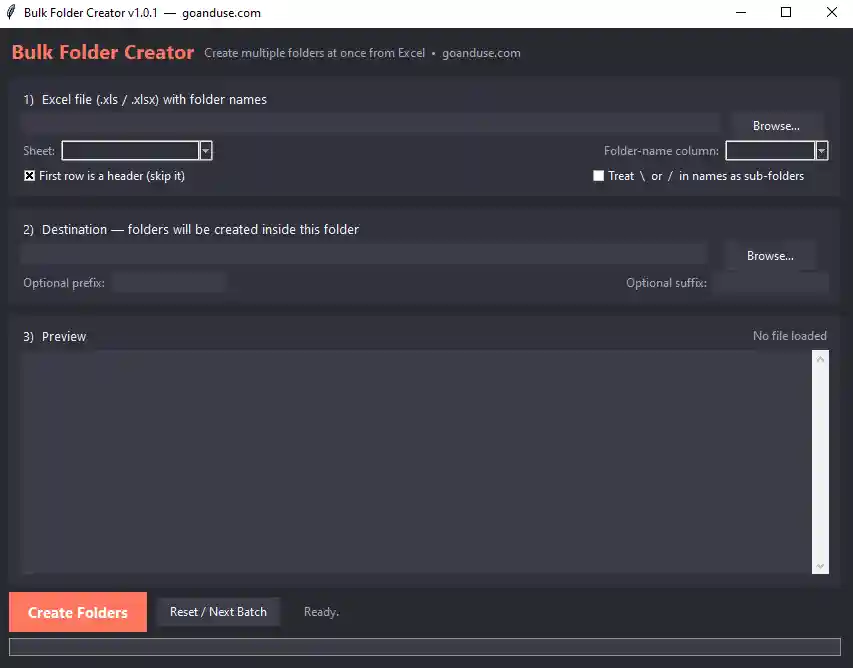
Key Features
- Create folders from ExcelReads both .xlsx and old .xls files — choose any sheet and any column.
- Live previewSee the exact folder list before anything is created — no surprises.
- Prefix & suffixAdd optional text before or after every folder name (e.g. 2026_ or _final).
- Sub-folder modeWrite Batch/2026/A in a cell to create nested folder structures automatically.
- Never overwritesFolders that already exist are skipped and reported — your data stays safe.
- CSV reportA complete log of every folder: Created, Skipped or Failed — open it in Excel.
- Windows-safe namesInvalid characters and reserved names are cleaned automatically — no crashes.
- Free & portable100% offline, no installation, no registration. Runs on Windows 7 to 11.
How to Create Multiple Folders at Once from Excel
- Download and extractGet the ZIP for your Windows version from the box above and extract it anywhere. No installation needed.
- Prepare your Excel filePut your folder names in one column — one name per row. A header row is fine.
- Open the app and select the fileClick Browse, pick your .xls or .xlsx file, then choose the sheet and the folder-name column.
- Choose the destinationSelect the folder where all the new folders should be created. Add an optional prefix or suffix if you need one.
- Check the previewThe app shows every folder name it found — confirm the count and the names look right.
- Click Create FoldersWatch the progress bar, then open the CSV report to verify every folder was created.
How to Create Multiple Folders Using a Batch Script (the Manual Way)
Before building this app, we used to do it the hard way — and you still can. Windows lets you create multiple folders with the md command in Command Prompt:
For folder names stored in a text file (one per line), a batch script with a FOR loop works:
This works, but it has real drawbacks: you must first export your Excel column to a plain text file, the script breaks on special characters like & or trailing spaces, there is no preview, no duplicate handling, and no report — one typo and you get a mess of wrong folders. That is exactly why we built Bulk Folder Creator: it does the same job directly from your Excel file, with a preview, safe name cleaning and a full CSV log. If you create folders more than once a month, the app pays for itself immediately — and it costs nothing.
Who Is It For?
Anyone who manages files at scale: schools and examination centres (one folder per student roll number), HR and admin teams (per-employee document folders), photographers and studios (per-client or per-event folders), accountants (per-company financial-year folders), and project offices (per-site or per-job folder trees using sub-folder mode).
System Requirements
| Operating system | Windows 7 / 8 / 10 / 11 |
|---|---|
| 64-bit build | Windows 10/11 (recommended) |
| 32-bit build | Windows 7 and older PCs — install vc_redist.x86.exe once first |
| Excel formats | .xlsx and .xls (Excel 97 onwards) |
| Installation | None — portable, just extract and run |
| Internet | Not required — works fully offline |
| Price | Free |
Frequently Asked Questions
How do I create multiple folders at once from an Excel list?
Is Bulk Folder Creator free?
Does it support old .xls files or only .xlsx?
Can it create nested sub-folders?
What happens if a folder already exists?
What about invalid characters in folder names?
Is it better than a batch script?
Does it work on Windows 7?
Bulk Folder Creator is developed and maintained by GoAndUse. Also check our free Barcode Reader software for PC, or browse all GoAndUse desktop software. Found a bug or need a feature? Contact us.
Free Desktop Software for Windows
Handy free tools from GoAndUse — 100% offline, no registration, Windows 7 to 11.
Scan barcodes from images in bulk (OMR sheets, labels, inventory) and auto-rename files with a CSV report.
PDF Compressor reduces PDF file size on your desktop with three compression levels — Light, Medium, and Strong. Process multiple files at once
Browse all free desktop software or explore online tools on GoAndUse.
Barcode Image Saver is powered by the open-source zxing-cpp barcode engine — one of the most widely used barcode libraries in the world.