Add Files Your Way
Add one PDF, thousands at once, or drop a whole folder straight onto the window — with recursive subfolder scanning and automatic duplicate detection.
Drag & drop · Recursive scan
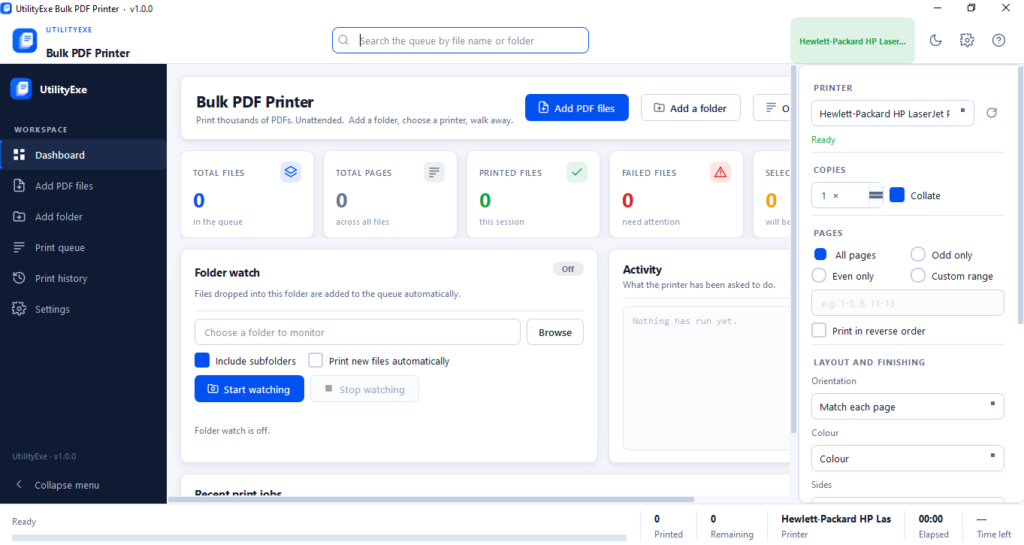
Printing PDF files one at a time is fine when there are three of them. It stops being fine when there are three hundred — which is exactly the situation in exam departments, accounts offices, data processing centres, and any desk that has to turn a folder of PDFs into a stack of paper before end of day. Bulk PDF Printer is a free Windows desktop app built to solve exactly that: add a folder, tick the files, hit print, and walk away. The app handles the rest — including the part where the printer jams halfway through and every basic PDF print tool just fails silently on the remaining 200 files.
sha256:53a62bc30cfca55c80b937390f3f177315002112d94e26ee0b21a19da18d353d
FEATURE SHEET — v1.0.0
Eight parts of the app working together so a 1,000-file print run needs exactly one click to start — and no babysitting to finish.
Add one PDF, thousands at once, or drop a whole folder straight onto the window — with recursive subfolder scanning and automatic duplicate detection.
Drag & drop · Recursive scanSort, search, and filter thousands of jobs without the interface slowing down — built to stay smooth well past the point most print queues fall over.
10,000+ files · ~0.02s to addPause, resume, or stop mid-run, with automatic retry on failed jobs and a configurable gap between jobs for small office printers.
Auto-retry · Configurable gapsWhen the printer goes offline, jams, or runs out of paper, the run pauses and tells you — instead of failing every remaining file in silence.
Pauses on printer errorsCopies, collate, page ranges, odd or even, orientation, colour, duplex, and sizing — set once and apply it to the whole batch.
1–999 copies · Custom rangesCorrupt, empty, missing, and password-protected files are flagged before the run starts — never discovered mid-batch.
Checked before printingPoint it at a drop folder and new PDFs queue themselves, with settle detection so half-copied files are never printed by mistake.
Settle detection · Network fallbackEvery job is logged locally and searchable — export the log to Excel, CSV, or a branded PDF report whenever you need proof.
XLSX · CSV · PDF exportMORE FROM GOANDUSE
Other Windows apps and a WordPress plugin, built and maintained by the same team behind Bulk PDF Printer.
Desktop Software
Scans barcodes from scanned OMR sheets or document batches in bulk, renames each file by its decoded value, and exports a CSV report.
Reads a list of names straight from an Excel file and creates every folder — with sub-folders — in one run. No batch script needed.
Converts .xls/.xlsx files to dBASE .dbf format offline — the format still required by many government and legacy data-entry systems.
Shrinks PDF file size with three compression levels, entirely offline, so large batches never need to touch the internet.
SUPPORT
Everything people usually ask before printing their first batch with Bulk PDF Printer.
Yes — it's free to download and use, part of the GoAndUse suite of free desktop tools.
No. It's a single-file EXE — download, extract, and double-click to run. No registry changes.
It detects them and reports them before printing, but it never attempts to guess or crack a password. Remove the protection in your PDF editor first, then re-add the file.
Yes. The app auto-detects installed local and network printers and shows live status — Ready, Offline, Out of paper, Paper jam, and more — with a manual refresh option.
The run pauses automatically and tells you what's wrong. Fix the printer, hit Resume, and the queue continues from where it stopped — nothing is lost or skipped.
Yes — choose all pages, odd only, even only, or a custom range like 1-5, 8, 11-13, in normal or reverse order.
Yes. The queue is built and tested for large batches — adding 10,000 files takes roughly 0.02 seconds, and printing runs sequentially so the printer spooler is never overwhelmed.
Locally, in a SQLite database on your own machine — nothing is uploaded anywhere. You can search it, filter it, and export it to Excel, CSV, or a PDF report anytime.
Not currently — Bulk PDF Printer supports Windows 10 and Windows 11 (64-bit) only.
GOOD TO KNOW
Some printer drivers rasterise PDFs poorly through the default path. Switch Settings → Printing engine → Method to the SumatraPDF helper — a free, open-source PDF renderer — and most rendering issues disappear.
If a run pauses on a printer error and power-cycling the device doesn't help, Microsoft's official printer troubleshooting guide covers spooler and driver fixes for Windows 10 and 11.