
Free PDF Compressor Desktop App for Windows – Reduce PDF File Size Instantly
Struggling with large PDF files? The PDF Compressor Desktop App is here to help. Whether you’re preparing documents for email, cloud storage, or faster uploads, this PDF Compressor tool makes shrinking your PDFs quick, simple, and completely offline.
PDF Compressor Desktop App – Shrink PDF Files Without Internet
sha256:bd2ca6bca1a9ee41d084283bdc5d3d7fdfd426da24ee3d67a486c018f504e741
System Requirements
PDF Compressor is lightweight and optimized for Windows systems. Check if your computer meets the minimum requirements below.
📋 Minimum Requirements
Operating System
- Windows 10 (64-bit) or later
- Windows 11 (64-bit)
Processor
Intel Core i3 or equivalent (or newer)
RAM
2 GB RAM
Disk Space
100 MB free space for installation
Internet
Not Required — works 100% offline
⭐ Recommended Setup
Operating System
- Windows 11 (latest version)
Processor
Intel Core i5/i7 or AMD Ryzen 5/7
RAM
4 GB RAM or higher
Storage
SSD for faster compression performance
Optional
Ghostscript installed (for maximum compression)
📦 Optional Software
Ghostscript
Not required, but recommended for maximum compression. PDF Compressor will automatically use Ghostscript if installed on your system for stronger image downsampling.
How to install: Download from ghostscript.com and run the installer. PDF Compressor will auto-detect it.
What Happens Without Ghostscript?
PDF Compressor will automatically fall back to its built-in compression engine. You'll still get excellent file size reduction — just not quite as much as with Ghostscript. The app never breaks — it always has a backup plan.
🚀 Installation & Setup
Download the App
Click the "Download Now" button below to download PdfCompressor.exe
Extract the ZIP
Right-click on the downloaded ZIP file and select "Extract All". Choose a folder on your PC (e.g., C:\Program Files)
Run the App
Double-click PdfCompressor.exe to launch the app. No installation, registry changes, or additional setup needed.
Start Compressing
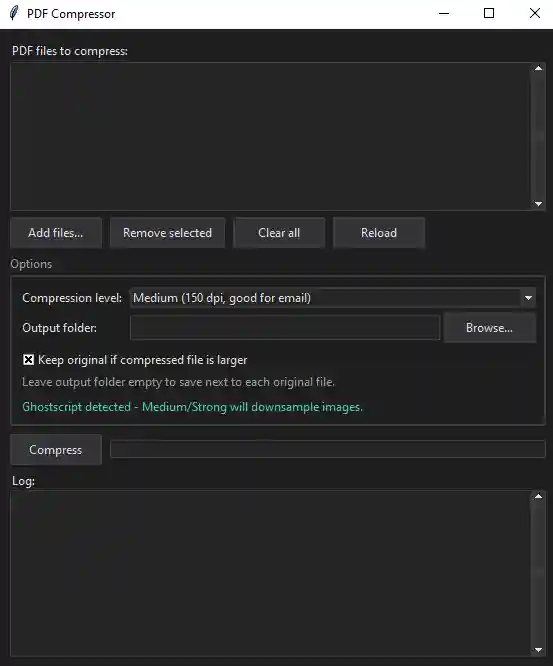
Select your PDF files, choose a compression level (Light, Medium, Strong), and click "Compress". Done!
ℹ️ Important Notes
- ✓ No Installation Required: The app runs directly from the .exe file. You can move it anywhere on your computer.
- ✓ 100% Free & Safe: Open source, no malware, no hidden costs or subscriptions.
- ✓ Portable: Use on a USB drive or cloud storage for access anywhere.
- ✓ Antivirus Safe: If antivirus flags the .exe, it's a false positive. Add it to your antivirus exclusion list.
- ✓ Uninstall: Simply delete the .exe file. No leftover files or registry entries.
More Free Desktop Software from GoAndUse
Explore our complete suite of free desktop applications designed to simplify your workflow
Excel to DBF Converter
Convert Excel files (.xls, .xlsx) to dBASE format (.dbf) instantly. Perfect for data migration and reporting workflows.
Download NowBarcode Image Saver
Scan and save barcodes from images in bulk. Extract barcode data and generate CSV reports automatically.
Download NowBulk Folder Creator
Create multiple folders at once from an Excel list. Save time with batch folder generation in seconds.
Download NowPDF Compressor
Desktop App
Reduce PDF file sizes up to 60% instantly on your Windows desktop. Work completely offline with full privacy protection.
Three Compression Levels
Light, Medium, Strong — choose what works for you
100% Offline & Private
Your files never leave your PC — full control guaranteed
Batch Processing
Compress multiple PDFs at once — save hours of manual work
v1.0.0 • Windows 10/11 (64-bit) • No Installation Required
Fast
Compress in seconds
Secure
No cloud upload
Batch Ready
Process many PDFs
Quality
Smart compression
1000+ downloads • Part of GoAndUse Suite
Why Use PDF Compressor?
Large PDF files slow you down. Our desktop app solves this problem instantly — without compromising your privacy.
Email Size Limits
Emails reject large attachments? PDF Compressor shrinks files instantly so you can send without delays or re-uploads.
Cloud Storage Full?
Running out of storage? Compress PDFs by up to 60% and reclaim gigabytes of disk space instantly.
Privacy Concerns
Don't trust online PDF tools with sensitive files? PDF Compressor works 100% offline — your files never leave your PC.
Manual Bulk Work
Compressing 50+ PDFs manually? Use batch processing to compress hundreds of files at once in minutes.
Internet Dependency
On unstable internet? PDF Compressor Desktop works completely offline — no connection needed, ever.
No Paid Subscriptions
Tired of subscription fees? PDF Compressor is 100% free, forever — no hidden costs, no paywalls.
PDF Compressor vs. Online Tools
❌ Online PDF Tools
- ✕ Files uploaded to third-party servers
- ✕ Privacy & security risks
- ✕ Requires active internet connection
- ✕ Slow for batch processing
- ✕ May require premium subscriptions
✓ PDF Compressor Desktop
- ✓ All processing on your PC
- ✓ 100% private & secure
- ✓ Works completely offline
- ✓ Lightning-fast batch processing
- ✓ Completely free, forever
Perfect For
📋 Business & Corporate
Prepare reports, proposals, and reports for email distribution without size restrictions.
🎓 Students & Educators
Reduce assignment PDFs, presentations, and research documents before submission.
📸 Photographers & Designers
Shrink portfolio PDFs and delivery files while maintaining visual quality.
🏢 Government & Compliance
Process bulk documents and reports offline without security or privacy concerns.
💼 Freelancers & Consultants
Deliver client documents faster with optimized file sizes and zero upload delays.
🌍 Remote Workers
No internet? Compress PDFs offline and upload when your connection is stable.
Frequently Asked Questions
Have questions about PDF Compressor? Find answers to common questions below. Can't find what you're looking for? Contact us.
PDF Compressor uses two powerful engines to reduce file size: (1) pikepdf for lossless stream optimization that works without quality loss, and (2) Ghostscript (optional) for image downsampling when you need maximum compression. You select your compression level (Light, Medium, or Strong), and the app intelligently chooses the best compression method for each file.
It depends on your compression level. Light mode uses lossless compression — no quality loss at all, just stream optimization. Medium and Strong modes may reduce image resolution slightly for more aggressive compression. You can always test with one PDF first and keep the original if you're not satisfied with the results.
Yes, completely. PDF Compressor works 100% offline — all compression happens on your PC. Your files never leave your computer, never upload to the cloud, and never touch any external servers. This is why PDF Compressor is safer than online tools for sensitive documents.
Absolutely! PDF Compressor supports batch processing. Select as many PDF files as you want, choose your compression level, and click Compress. The app will process all files automatically. This is perfect for businesses, government agencies, and anyone dealing with bulk documents.
No, you do not need internet at all. PDF Compressor works 100% offline. Download the app once, and use it anytime, anywhere — even on airplanes, in remote areas, or on networks without connectivity. This also means better privacy and faster compression speeds.
Light mode uses lossless compression for modest file size reduction with zero quality loss. Medium mode reduces image resolution to 150 dpi for better compression. Strong mode aggressively compresses to 72 dpi for maximum file size reduction. Choose Light for documents where quality matters most, Medium for balanced compression, and Strong for email or storage where file size is critical.
No installation required. PDF Compressor is a portable .exe file. Just download, extract the ZIP, and double-click the .exe to run. No registry changes, no system modifications. You can even store it on a USB drive or cloud storage for portable access across computers.
Simply delete the .exe file. That's it. No leftover files, no registry entries, no uninstaller needed. PDF Compressor is completely portable with zero system footprint.
Yes, 100% free, forever. No hidden costs, no premium tier, no subscriptions, no ads, no watermarks. PDF Compressor is completely free to download and use. It's part of the GoAndUse suite of free desktop tools.
No problem. PDF Compressor automatically falls back to its built-in compression engine (pikepdf). The app will still compress your PDFs effectively — you just won't get the absolute maximum compression that Ghostscript provides. The app never breaks; it always has a backup plan.
PDF Compressor works with standard PDF files (.pdf). It supports scanned PDFs, text PDFs, and PDFs with images. If you need to convert other formats (like Word, Excel, or images) to PDF first, you can use other GoAndUse tools for that conversion.
Currently, PDF Compressor is available for Windows 10 and Windows 11 (64-bit) only. Mac and Linux versions are not available at this time. Check back later for updates.