
PDF Page Extractor: Offline PDF Page Splitter for Windows
Extract or split PDF pages offline — lossless, bookmark-safe, no account needed
Screen Short
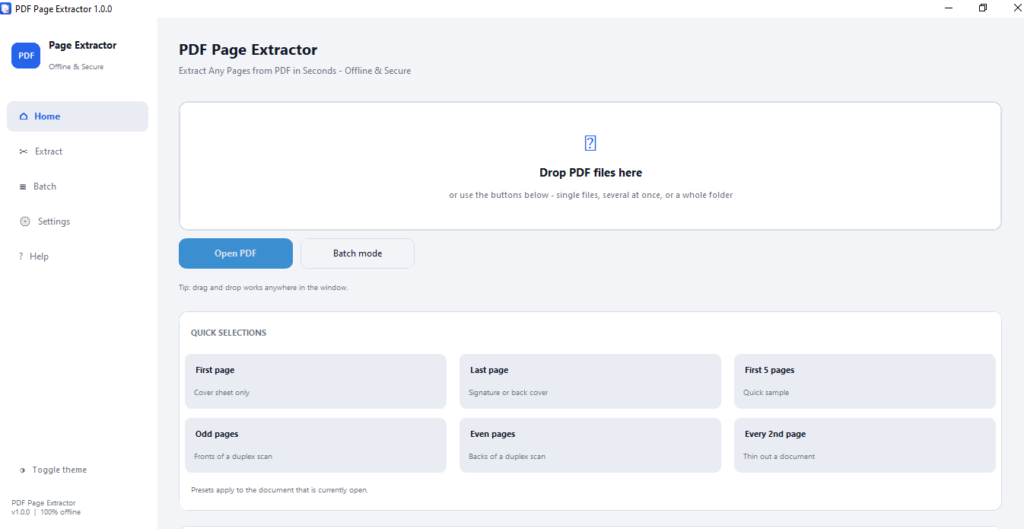
PDF Page Extractor
sha256:3524f06f0658e21d657b43936bf9a7e5e0433ae4441ca3ef831c5efb89a4f8d2
PDF Page Extractor
Pull exactly the pages you need from any PDF — nothing uploaded, nothing left behind.
Point it at a PDF, type the pages you want — 1,5-10,odd — and PDF Page Extractor hands back clean output files: same fonts, same vectors, same rotation, same metadata as the original. Pages are copied whole rather than redrawn, so there's no quality setting because there's no quality loss.
It runs entirely on your machine. There's no account to create, no file to upload, and no network call of any kind — pull the network cable and it still works. Need to do this to three hundred PDFs instead of one? Batch mode applies the same rule to a whole folder, with pause, resume, and a report you can hand to someone else.
What it does
Type the pages you want
Expressions like 1,5-10,odd, last 5 or every 3rd page are parsed forgivingly — spaces don't matter and typos get a gentle hint instead of an error dialog.
Two ways to split
Chop the whole file into equal pieces automatically, or pull exact custom ranges into one combined PDF or a separate file per range.
Nothing gets redrawn
Original fonts, vectors, images, rotation and metadata carry across untouched, because pages are copied rather than re-rendered.
Bookmarks survive
Outline entries are remapped to the new page numbers and re-levelled, instead of quietly breaking or vanishing.
Batch hundreds of files
One rule, a whole folder, with pause, resume and cancel — plus an exportable TXT, CSV or JSON report when it's done.
Name files your way
Prefixes, suffixes, auto-numbering, or placeholders like {name}_p{page}, with a live preview before you commit.
See before you extract
A lazy-loading thumbnail strip plus a large page view with zoom, rotate and fit-to-width.
Fully offline
No account, no upload, no telemetry, no network call of any kind — it works with the cable pulled out.
Questions people ask before installing
Is my PDF actually uploaded anywhere?
No. PDF Page Extractor makes no network call of any kind — opening, previewing and extracting all happen locally, so it works even with no internet connection at all.
Will extracting pages change the quality or strip out metadata?
No. Pages are copied directly from the original file rather than redrawn, so fonts stay selectable, images keep their original bytes, and rotation and metadata carry over unchanged.
What happens to bookmarks when I only extract some pages?
Any bookmark pointing at a page you kept is remapped to its new page number and kept in the outline. Bookmarks pointing at pages you didn't select are dropped, so the tree stays valid instead of linking nowhere.
What's the difference between "Split every N pages" and "Custom pages"?
Split every N pages chops the whole file into equal-sized pieces automatically — load it, pick a number, and go. Custom pages pulls out exactly the pages or ranges you type, either as one combined file or a separate file per range.
Can it handle a whole folder of PDFs at once?
Yes. Batch mode applies one rule to any number of files, works out page counts and "last page" separately for each one, and can pause, resume or cancel mid-run without leaving a half-written file behind.
Does it work with password-protected PDFs?
Yes — you'll be prompted for the file's open (user) password before it's processed. Some PDFs use a separate owner password, which isn't the one it asks for.
My antivirus flagged the installer. Is that normal?
It can happen with unsigned Windows executables and is a heuristic false positive rather than a sign of anything malicious. Choosing "More info → Run anyway" lets it proceed.
Is there a Mac or Linux version?
The packaged download is a Windows .exe, but the underlying program is plain Python and will run from source on macOS and Linux with Python and its dependencies installed.
More from GoAndUse
Bulk PDF Printer
Send a whole batch of PDFs to the printer in one pass instead of opening each one.
View Bulk PDF PrinterBarcode Reader
Read and decode barcodes on Windows without an internet connection.
View Barcode ReaderBulk Folder Creator
Generate a whole folder structure in one go instead of clicking "New Folder" by hand.
View Bulk Folder Creator